2005 · Üniversite bitirme projesi2005 · University graduation project
EyeJudge
İris ile kimlik doğrulama. Kullanıcı NumPad'den kimliğini girer, # tuşuna basar; sistem gözün fotoğrafını çekip doğrular, onay verirse seri port üzerinden kapıyı açar.
Identity verification by iris. The user types an ID on a numeric keypad and presses #; the system captures the eye, verifies it, and, if approved, opens the door over a serial port.
Bu sayfa bir tanıtım değil, bir hatıra: üniversitede yaptığımız projenin yaşamaya devam etmesi için.
This page is not a pitch, it is a keepsake: a way to keep a university project alive.
Yusuf Arif Erdem & Mehmet Sarıoğlu
Kapıdan geçiş: beş adımGetting through the door: five steps
-
1
KimlikID
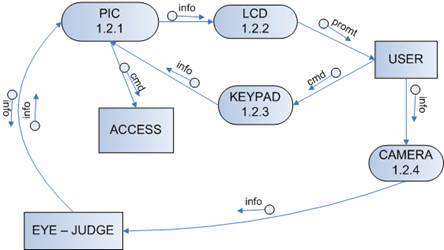
Kullanıcı NumPad'den kullanıcı numarasını girer. PIC mikrodenetleyici tuş matrisini tarar, LCD ekran yönlendirme mesajlarını gösterir.
The user enters their ID on the keypad. A PIC microcontroller scans the key matrix; an LCD shows prompts.
-
2
#
# tuşu girişi bitirir. PIC, numarayı RS232 ile bilgisayardaki ana programa yollar; program kullanıcının kayıtlı olup olmadığına bakar.
# ends the entry. The PIC sends the number over RS232 to the host program, which checks that the user is enrolled.
-
3
KareCapture
Kızılötesi aydınlatmalı kamera gözün bir karesini çeker (FireWire ile aktarılır). Yansımayı azaltmak için kameranın önüne bir göz siperliği konmuştu.
An infrared-lit camera captures a frame of the eye (transferred over FireWire). An eye shield in front of the camera cut reflections.
-
4
DoğrulamaVerification
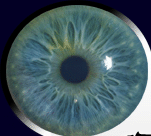
MATLAB'dan derlenmiş bir DLL, iris bölgesini bulur, kareyi eigeniris uzayına izdüşürür ve yalnızca o kimliğin kayıtlı örnekleriyle Öklid uzaklığını eşiğe karşı denetler.
A DLL compiled from MATLAB locates the iris, projects the frame into the eigeniris space and compares the Euclidean distance with a threshold, against that ID's enrolled samples only.
-
5
KapıDoor
Uzaklık eşiğin altındaysa program seri porttan komut gönderir; PIC kapıyı ayarlanan süre boyunca açık tutar. Değilse erişim reddedilir.
If the distance is under the threshold, the program sends a command over the serial port and the PIC holds the door open for a configured time. Otherwise access is denied.
Kendin dene: NumPad simülasyonuTry it: keypad simulation
Bir kimlik gir (demo için 1001–1015), #'e bas. Sonra "kimin gözü" olduğunu seç ve sistemin uzaklık/eşik kararına bak. Eski yazılımda da donanımsız test için bir simülasyon modu vardı.
Enter an ID (1001–1015 for the demo) and press #. Then choose whose eye it is and watch the distance/threshold decision. The original software also had a simulation mode for testing without the hardware.
Bu bir canlandırmadır: ekrandaki metinler ve uzaklık değerleri gerçek LCD çıktısı ya da ölçüm değildir. * siler.
This is an illustration: the on-screen texts and distance values are not real LCD output or measurements. * clears.
Sonuçlar ve dürüst bir notResults, and an honest note
Neden %100? Ve ne anlama gelmez?Why 100%, and what it does not mean
Sistem 1:1 doğrulama yapıyordu: önce kimlik (NumPad), sonra göz. Yani sorun "bu göz 15 kişiden hangisi?" değil, "bu göz, bu kimliğe ait mi?" idi. Bu, problemi ciddi ölçüde kolaylaştırır.
Rapordaki %100, kapalı bir kümede (15 kayıtlı kişi, aynı kamera ve aydınlatma düzeni) ölçüldü; kayıtsız yabancıların denendiği bir sınama yok. PIN'siz tanıma testi de aynı kümede %100 çıkmış, ancak küme büyüdükçe, ışık ve odak değiştikçe bu sayıların aynı kalacağı söylenemez. Erken denemede CASIA veri tabanıyla, iris tespiti yapılmadan ve kişi başına 3 eğitim görüntüsüyle %72 alınmıştı.
Yani: öğrenci projesi için gurur verici bir sonuç, ama bir güvenlik iddiası değil.
The system did 1:1 verification: ID first, then the eye. The question was not "which of 15 people is this?" but "does this eye belong to this ID?", which is a much easier problem.
The 100% in the report was measured on a closed set (15 enrolled people, same camera and lighting setup); there was no test with unenrolled strangers. Identification without the PIN also reached 100% on that set, but nothing guarantees the same as the set grows or the lighting and focus change. An early run on CASIA, without iris detection and with 3 training images per person, gave 72%.
So: a proud result for a student project, but not a security claim.
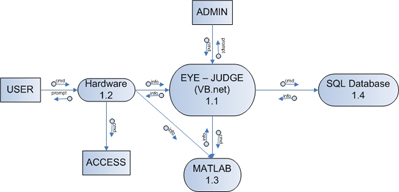
MimariArchitecture
YazılımSoftware
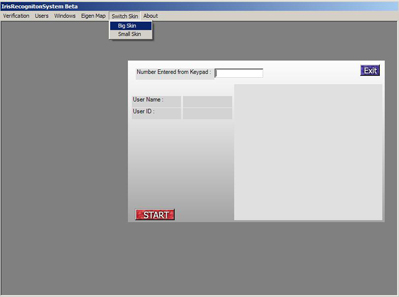
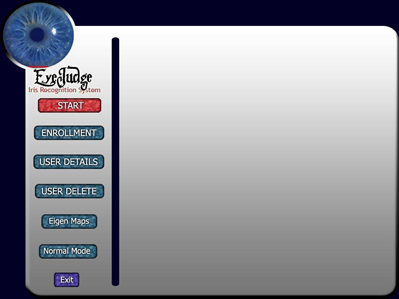
- VB.NET ana program: kayıt, doğrulama, kullanıcı silme, ayarlar (eşik, COM portu, kapının açık kalma süresi). Üç farklı "skin".
- MATLAB m-dosyaları,
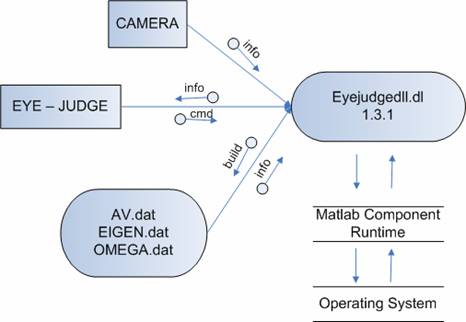
eyejudgedll.dllolarak derlenip VB.NET'e gömüldü. PCA, iris bulma ve kameradan kare alma burada. - SQL Server: kullanıcılar, orijinal göz görüntüleri ve günlükler (üç tablo: User, Picture, Log).
- PicBasic Pro + Proteus: PIC16F877'nin yazılımı ve devre benzetimi. Arayüz Photoshop ile tasarlandı.
- VB.NET main program: enrollment, verification, user deletion and settings (threshold, COM port, door-open time). Three skins.
- MATLAB m-files compiled into
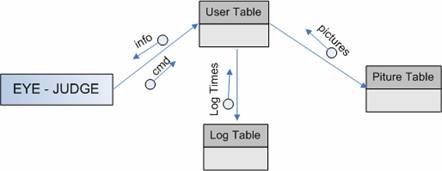
eyejudgedll.dlland embedded in VB.NET: PCA, iris detection and camera capture. - SQL Server: users, original eye images and logs (three tables: User, Picture, Log).
- PicBasic Pro + Proteus: firmware and circuit simulation for the PIC16F877. The UI was designed in Photoshop.
DonanımHardware
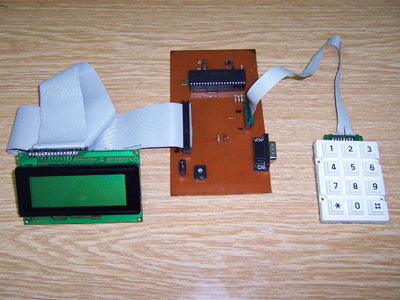
- PIC16F877: tuş matrisini tarar, LCD'yi sürer, RS232 ile konuşur.
- 4×20 LCD ve standart matris NumPad.
- Kamera: kızılötesi aydınlatmalı el kamerası, FireWire bağlantılı; karanlık bir ortamda göz siperliğiyle kullanıldı.
- Kapı: seri porttan gelen komutla açılır.
- PIC16F877: scans the key matrix, drives the LCD, talks RS232.
- 4×20 LCD and a standard matrix keypad.
- Camera: infrared-lit handheld camera over FireWire, used in a dark setting with an eye shield.
- Door: opened by a serial command.
 1
2
3
1
2
3
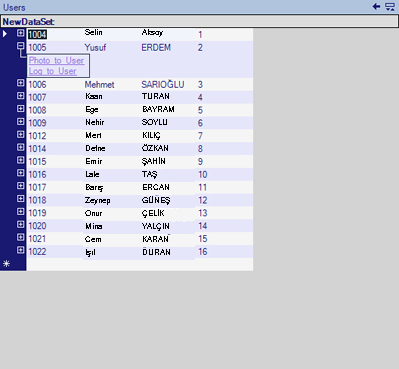
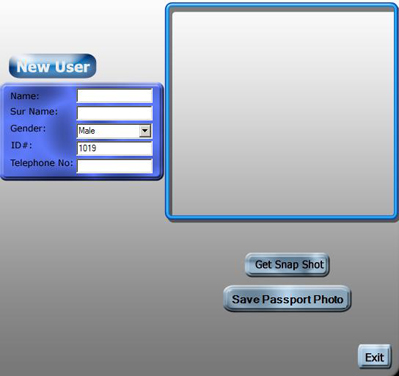
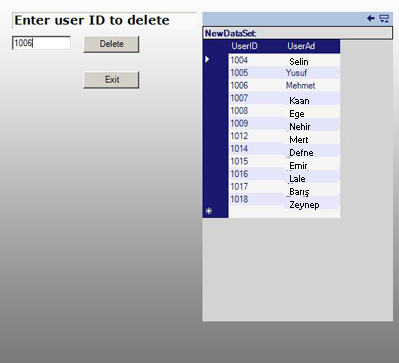
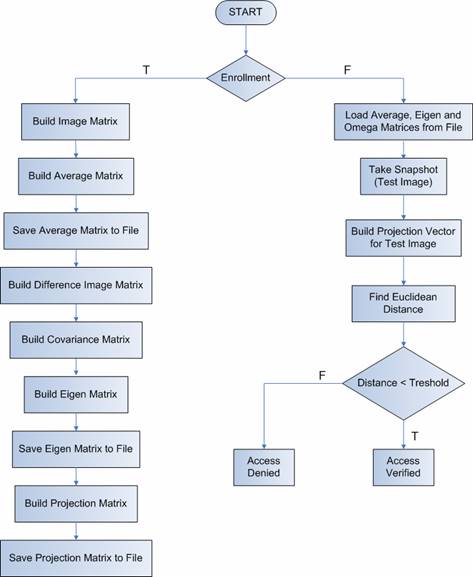
Kayıt ve doğrulama akışıEnrollment and verification flow
- Kayıt (eğitim)Enrollment (training)
- Pasaport fotoğrafı + 10 göz fotoğrafı çekPassport photo + 10 eye pictures
- Görüntü matrisini kur, ortalama görüntüyü bulBuild image matrix, compute the average image
- Fark matrisi ve kovaryans matrisiDifference and covariance matrices
- Özvektörler (eigeniris) ve izdüşüm matrisiEigenvectors (eigenirises) and projection matrix
- Dosyalara kaydet (AV, EIGEN, OMEGA)Save to files (AV, EIGEN, OMEGA)
- DoğrulamaVerification
- Ortalama, eigeniris ve omega matrislerini yükleLoad average, eigen and omega matrices
- Kare çek (test görüntüsü)Take a snapshot (test image)
- Test görüntüsünün izdüşüm vektörünü hesaplaCompute the test image's projection vector
- Öklid uzaklığını bulCompute the Euclidean distance
- Uzaklık < eşik ise onay, değilse redDistance < threshold → verified, else denied
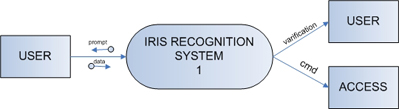
2005'ten orijinal şemalarOriginal diagrams from 2005
PCA ve eigenirisand eigeniris
Her göz görüntüsü gri tonlamaya çevrilir ve sütunları üst üste dizilerek bir vektör olur. Eğitim kümesindeki görüntülerin ortalaması (Ψ) çıkarılır; kalan farkların kovaryans matrisinin özvektörleri, "hayalet görüntüler" olarak görülebilen eigeniris'leri verir. En büyük özdeğerli ilk birkaç tanesi bir "göz uzayı" kurar.
Bir test görüntüsü bu uzaya izdüşürülür (ωk = ukᵀ(Γ − Ψ)) ve kayıtlı sınıfla uzaklığı εk = ‖Ω − Ωk‖² hesaplanır. Uzaklık eşiğin altındaysa eşleşme vardır, aksi halde görüntü "bilinmeyen"dir.
Pratik fayda: yüzlerce özvektörden yalnızca ilk 20 kadarı yeterliydi; bu da veri tabanını ve süreyi küçültüyordu.
Each eye image is converted to grayscale and its columns are stacked into a vector. The average of the training images (Ψ) is subtracted; the eigenvectors of the covariance matrix of the differences give the eigenirises, which can be viewed as "ghost images". The few with the largest eigenvalues span an "eye space".
A test image is projected into this space (ωk = ukᵀ(Γ − Ψ)) and its distance to the enrolled class is computed as εk = ‖Ω − Ωk‖². Under the threshold means a match; otherwise the image is "unknown".
Practical benefit: of hundreds of eigenvectors, only about the first 20 were needed, shrinking both the database and the run time.
İris, diğer biyometriklere karşıIris versus other biometrics
| YüzFace | Parmak iziFingerprint | El geometrisiHand geometry | İris | |
|---|---|---|---|---|
| TemassızContactless | ✓ | ✗ | ✗ | ✓ |
| Raporun öne çıkardığı zayıflıkWeakness the report stresses | Işık, yaş, gözlük, saç/sakal, maskeLight, age, glasses, hair/beard, masks | Kuru, yağlı ya da yaralı parmak; büyük kümede yavaş aramaDry, oily or injured fingers; slow search on large sets | Hava, hamilelik, ilaç, yaşla el boyu değişimiWeather, pregnancy, medication, hand size changing with age | Göz yüzeyinin ışığı yansıtması (bu yüzden kızılötesi + siperlik)Eye surface reflecting light (hence infrared + shield) |
| DonanımEquipment | KameraCamera | Okuyucu (temiz tutulmalı)Reader (must stay clean) | Büyük, pahalıLarge, expensive | Kamera + aydınlatmaCamera + lighting |
| RızaConsent | Fark edilmeden çekilebilirCan be captured unnoticed | Kullanıcı dokunurUser touches | Kullanıcı dokunurUser touches | Kullanıcı bakarUser looks |
Bu tablo 2005 raporundaki karşılaştırmanın özetidir. Raporda iris için "1,2 milyonda 1 yanlış kabul", parmak izi için "100 binde 1" gibi rakamlar da geçer; bunlar dönemin kaynaklarından alınmıştır ve bugünkü literatürle yeniden doğrulanmadı.
This table summarizes the comparison in the 2005 report. The report also quotes figures such as "1 in 1.2 million false accepts" for iris and "1 in 100,000" for fingerprint; they come from the sources of the time and were not re-verified against current literature.
İris biyometrisinin arkasındaki fikir 1980'lerde Flom ve Safir'in, algoritma ise 1990'larda John Daugman'ın çalışmalarına dayanır. EyeJudge bunların yerine geçen bir şey değil, PCA tabanlı basit bir öğrenci uygulamasıdır.
The idea of iris biometrics goes back to Flom and Safir in the 1980s and the algorithm to John Daugman in the 1990s. EyeJudge is not a substitute for these; it is a simple PCA-based student implementation.
Proje raporuProject report
Matematik, tasarım, devre ve test sonuçlarının tamamı raporda. Rapor İngilizce.
All the mathematics, design, circuitry and test results are in the report. It is written in English.
FYPReport.pdf indirDownload FYPReport.pdf PDF · 1,6 MB · 2005